Best Commercial Vehicle Diagnostic Tools for Class 2-8 Fleets (2026 Guide)
The best commercial vehicle diagnostic tools for a Class 2-8 fleet are all-makes platforms that cover light commercial vehicles, medium-duty trucks, heavy-duty trucks, buses, trailers, and vocational vehicles. It should support live data, bi-directional testing, DPF regens, parameter changes, repair information, and documentation. For mixed fleets, Triad offers the best solutions available based on your choice of hardware platform and reliance on OEM software.
If your technicians are juggling one program for light commercial units, another for engines, another for brakes, another for trailers, and a fourth for aftertreatment, then servicing vehicles is already costing you more in time and expense than it should.
Modern fleet diagnostics is a workflow problem as much as a tool problem. One Class 8 truck can bring multiple systems, suppliers, networks, and fault paths into the same repair order. Add Class 2 service trucks, Class 3-6 delivery units, buses, reefers, trailers, and mixed brands, and that “simple scan” can turn into a scavenger hunt with a laptop charger.
TL;DR: What Class 2-8 Fleets Need in a Diagnostic Tool
Class 2-8 fleets need diagnostic coverage that matches the full yard, not just the biggest trucks. A strong platform should help technicians diagnose light commercial units, medium-duty vehicles, heavy-duty trucks, buses, trailers, reefers, and vocational equipment from a consistent workflow.
| Fleet Need | What to Look For |
|---|---|
| Mixed vehicle classes | Coverage for Class 2 light commercial vehicles through Class 8 trucks |
| System depth | Engine, transmission, brakes, aftertreatment, electrical, trailer, and reefer support |
| Bi-directional controls | DPF regens, injector coding, cylinder cutout tests, parameter changes, and active tests |
| Repair information | Guided troubleshooting, parts locators, system diagrams, wiring diagrams, maintenance data, technical specifications and standard repair times |
| Fleet documentation | Reports that support technician consistency, repair tracking, and fewer missed issues with the ability to integrate into your Fleet Management System |
For fleet maintenance leaders, the right commercial vehicle diagnostic platform helps reduce dealer dependency, improve repair speed, standardize technician workflow, and keep more work inside the shop.
This guide breaks down the best commercial vehicle diagnostic tools for Class 2-8 fleets in 2026, what each tool is best suited for, and how to choose a setup that helps your technicians fix faster, document better, and reduce delays.
What Counts as a Class 2-8 Commercial Vehicle?
Class 2-8 vehicles are grouped by gross vehicle weight rating, or GVWR. Class 2 covers many light commercial vehicles, including heavier pickups, vans, service trucks, and cutaway units. Class 3-6 vehicles are generally medium duty, while Class 7-8 vehicles include heavy-duty trucks and tractors.
For fleet maintenance teams, the important point is simple: Class 2-8 fleets often blend light commercial, medium-duty, and heavy-duty assets under one maintenance operation. That means one shop may need to diagnose everything from a service van to a box truck to a Class 8 tractor.
Class 2: Light commercial fleet vehicles
Class 2 vehicles often include heavier pickups, vans, utility units, service trucks, and last-mile delivery vehicles. These vehicles may look closer to automotive repair on the surface, but fleet use changes the diagnostic need fast.
High mileage, stop-and-go routes, upfitted equipment, telematics, electrical loads, and tight schedules make Class 2 diagnostics more demanding than a basic light-duty scan. A good fleet diagnostic setup should help technicians check full-system faults, service resets, emissions-related issues, electrical problems, live data, and vehicle health reports without treating these units like an afterthought.
Class 3-6: Medium-duty fleet vehicles
Class 3-6 fleets often include delivery trucks, service trucks, box trucks, smaller buses, utility vehicles, and vocational units. These vehicles may share some light-duty service patterns, but their systems, duty cycles, emissions requirements, and network protocols can put them beyond the reach of basic automotive scanners.
A good Class 3-6 diagnostic tool should support full-system scanning, aftertreatment service, ABS and brake systems, electrical faults, live data, service resets, and documentation. For fleets that run gas, diesel, and alternative fuel units, coverage by make, model, and system matters more than the badge on the tool.
Class 7-8: Heavy-duty trucks and tractors
Class 7-8 vehicles bring heavier repair stakes. These are the trucks where a bad diagnostic path can tie up a bay, delay a route, or send work to the dealer when your shop should have handled it in-house.
The 2025 ATRI operating cost update reported an average truck operating cost of $2.260 per mile in 2024, with non-fuel costs reaching $1.779 per mile. That makes diagnostic processes and utilization the most important tool in your shops. It is a cost problem that compounds every hour a unit is out of service all contingent on overall vehicle health.
Why vehicle class changes diagnostic requirements
The broader the vehicle class range and the more diverse the fleet, the more your tool has to handle:
- Light commercial vehicle systems and service functions
- Engine, transmission, brakes, and aftertreatment
- J1939, J1708, J1587, CAN, PLC, and other network protocols
- DPF regens, injector coding, cylinder cutout tests, and parameter changes
- Trailer ABS and reefer diagnostics
- Guided troubleshooting and wiring diagrams
- Full repair documentation across multiple technicians and locations
A Class 2-8 fleet needs more than a scanner that reads codes. It needs a diagnostic workflow that helps technicians move from fault to fix across every vehicle that rolls into the shop.
Quick Comparison: Best Commercial Vehicle Diagnostic Tools for Fleets (2026)
The product notes below reflect current Triad product pages for Jaltest Commercial Vehicle, Autel MS909CV, Autel MS908CVII, and Autel MD600CV.
| Rank | Tool Type | Best Fit | Key Strength | Watch-Out |
|---|---|---|---|---|
| 1 | Jaltest Commercial Vehicle backed by Triad | Mixed Class 2-8 fleets, commercial repair shops, buses, trailers, vocational vehicles | Deep multi-brand coverage, bi-directional controls, integrated repair information, reporting, and full fleet workflow support | Best value comes when technicians are trained and the tool is built into intake and repair processes |
| Nexiq E-TECHNICIAN | Class 5-8 fleets, commercial repair shops, buses, trailers, vocational vehicles | Deep multi-brand coverage, bi-directional controls, linked repair information, reporting, and full fleet workflow support | Functionality of bi-directional controls focuses on the most popular testing capabilities. Great to pair with OEM software platforms. | |
| 2 | Autel MaxiSYS MS909CV | Fleets and shops wanting a tablet-based commercial vehicle platform with broad coverage | Class 1-9 coverage, topology mapping, bi-directional controls, J2534 pass-thru, ADAS support | Static ADAS calibration requires additional frame equipment |
| 3 | Autel MaxiSYS MS908CVII | Mid-range commercial shops and fleet teams upgrading from basic scan tools | Class 2-8 diagnostics, full-system AutoScan, bi-directional tests, 40+ service functions | Less advanced than MS909CV for higher-end workflows |
| 4 | Autel MD600CV | Owner-operators, mobile techs, and fleets needing fast triage | Quick wireless diagnostics, DPF regen, oil reset, injector coding, brake bleed | Better as a triage and maintenance tool than a full fleet standard |
| 5 | OEM diagnostic software stack | Single-brand fleets or dealer-level programming events | Brand-specific depth for certain OEM functions | Higher admin load, multiple subscriptions, more training demand |
| 6 | Basic code reader or adapter-only setup | Quick fault checks and roadside triage | Low upfront cost and simple use | Limited repair guidance, limited system depth, weaker documentation |
Best Overall: Jaltest Commercial Vehicle for Mixed Class 2-8 Fleets
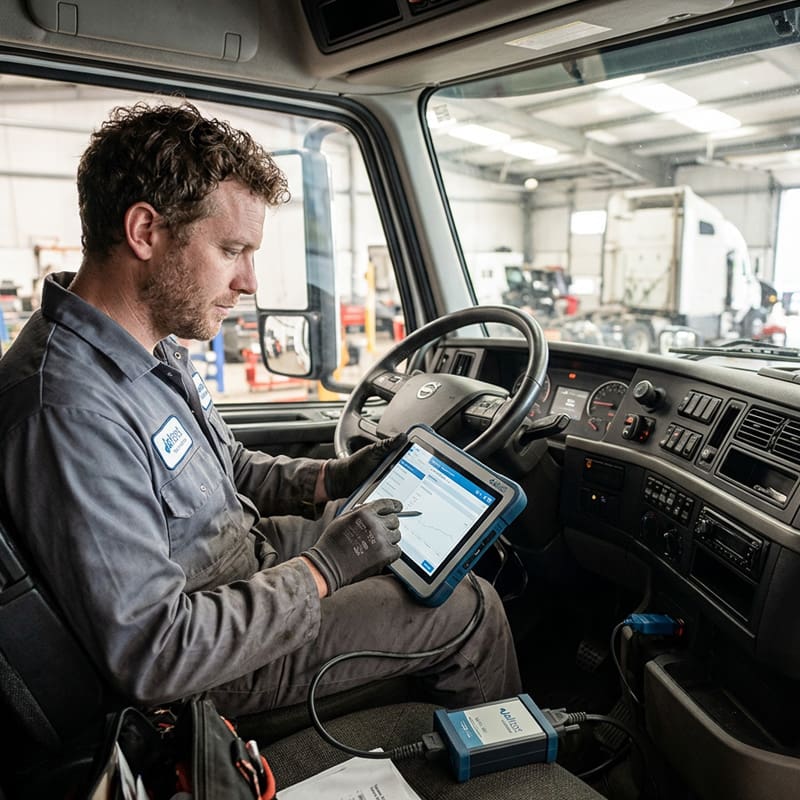
For a fleet with mixed makes, mixed vehicle classes, and multiple system types, Jaltest Commercial Vehicle is the best overall fit in this category.
Jaltest Commercial Vehicle gives fleet teams a single diagnostic workflow for light commercial, medium-duty, and heavy-duty vehicles, along with buses, trailers, reefers, and vocational applications. It supports thousands of bi-directional controls, parameter setting changes, maintenance functions, troubleshooting, repair information, cylinder cutout tests, DPF regens, injector programming, and other commands.
Why Jaltest fits mixed fleet maintenance
Mixed fleets create mixed problems. One bay might have a Class 2 service truck. The next might have a medium-duty box truck. A Class 8 tractor may need aftertreatment work. A trailer ABS issue may be waiting outside. A reefer unit may need attention before dispatch.
That is exactly where a single-platform diagnostic approach starts to pay off.
What Jaltest helps technicians do
A strong heavy-duty truck diagnostic tool should help the technician make decisions. Jaltest Commercial Vehicle bring that work into one workflow with:
- Automatic system and fault code detection
- Real-time data monitoring
- Bi-directional testing
- Parameter resets and calibrations
- Guided diagnostics
- Interactive wiring diagrams
- Technical specifications
- Maintenance schedules
- Standard repair times
- Diagnostic reporting through Jaltest GRP
Why buy Jaltest from Triad
Jaltest is the platform. Triad is the team that helps make it work inside your operation.
Triad supports commercial vehicle fleets and shops with tool selection, setup, onboarding, training, workflow support, U.S.-based technical support, and long-term consultation. That support layer matters because a diagnostic platform only pays off when technicians use it correctly and consistently. A diagnostic tool sitting on a shelf has the same ROI as a fancy paperweight.
Best OEM-Focused Workflow Platform: Nexiq E-Technician
For fleets that still rely heavily on OEM diagnostic software but want a more efficient way to manage daily diagnostics, NEXIQ E-Technician is one of the strongest options available.
Unlike a traditional OEM software stack that requires technicians to determine which program to launch before diagnostics begin, E-Technician provides a centralized workflow that helps identify vehicle systems, access fault information, perform common bi-directional tests, and launch OEM applications when deeper manufacturer-specific functionality is required.
For many Class 5-8 fleets, E-Technician serves as the primary diagnostic environment for day-to-day troubleshooting while reducing the complexity of managing multiple OEM software platforms.
Why Nexiq E-Technician Fits Commercial Fleets
Many fleets face a common challenge: technicians spend valuable time determining which OEM software package is required for the engine, transmission, ABS system, body controller, or aftertreatment system before diagnostics can even begin.
E-Technician helps simplify that process by bringing vehicle and component diagnostics into a single platform while maintaining access to OEM software when needed.
What Nexiq E-Technician Helps Technicians Do
- Perform complete vehicle and component diagnostics
- Read and clear fault codes across multiple systems
- Monitor live vehicle data
- Perform commonly used bi-directional tests
- Access integrated repair information through Mitchell 1
- Launch OEM software from a centralized platform
- Generate diagnostic reports
- Reduce time spent switching between software environments
For fleets running multiple truck brands, engines, and component manufacturers, E-Technician helps standardize the diagnostic process while preserving access to OEM-level functionality when required.
Best Advanced Autel Option: MaxiSYS MS909CV
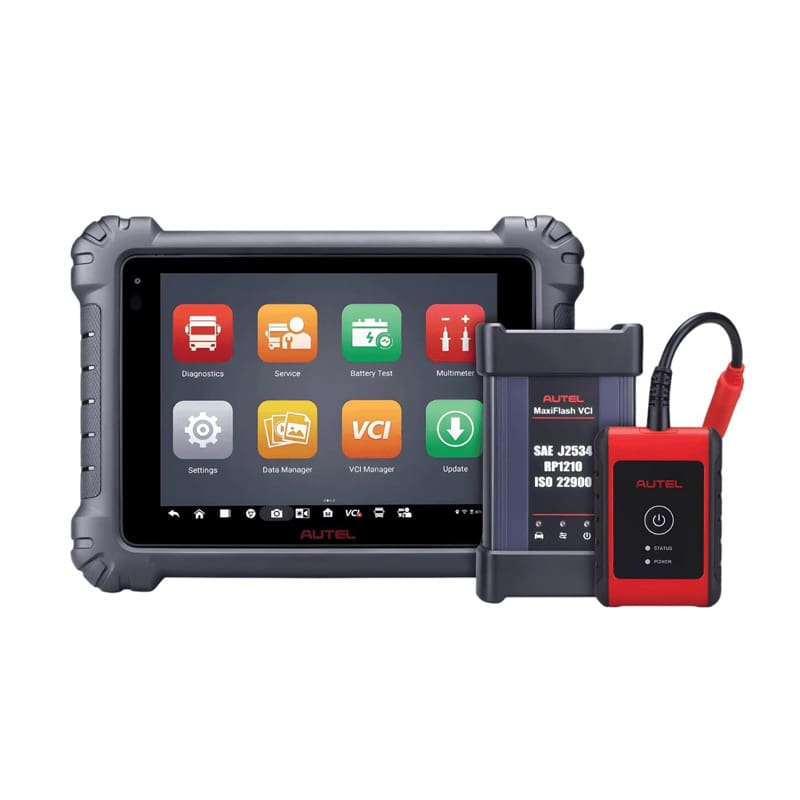
The Autel MaxiSYS MS909CV is a good option for fleets and shops that want an advanced tablet-based commercial vehicle diagnostic platform.
It supports light, medium, and heavy-duty commercial vehicles, with Class 1-9 coverage, topology mapping, bi-directional controls, J2534 pass-thru capability, and ADAS support for applicable commercial vehicle workflows.
When the MS909CV makes sense
The MS909CV fits operations that need:
- Broad commercial vehicle coverage
- Class 1-9 diagnostic flexibility
- A modern tablet workflow
- Full-system diagnostics
- Topology mapping for supported vehicles
- Bi-directional controls and active tests
- J2534 pass-thru programming support
- Starting and charging system analysis
- ADAS calibration support for supported commercial vehicles
For teams already familiar with Autel, the MS909CV can be a practical step into broader commercial diagnostics, especially when the fleet includes Class 2 light commercial vehicles alongside medium-duty and heavy-duty units.
Jaltest Commercial Vehicle vs Nexiq E-Technician vs Autel MS909CV
These three platforms approach fleet diagnostics differently.
Jaltest Commercial Vehicle
Jaltest is often the best fit for fleets looking to reduce dependence on OEM software and create a standardized diagnostic process across multiple vehicle makes, systems, and locations.
Its strengths include:
- Extensive multi-brand coverage
- Deep bi-directional functionality
- Guided troubleshooting
- Integrated repair information
- Total vehicle diagnostic routines
- Jaltest GRP reporting and utilization tracking
- Reduced OEM software dependency
For fleets focused on technician efficiency, consistency, and complete vehicle health assessments, Jaltest is often the strongest long-term platform.
Nexiq E-Technician
E-Technician is well suited for fleets that continue to rely on OEM software as part of their diagnostic strategy.
Its strengths include:
- Complete vehicle and component diagnostics
- Integration with Mitchell 1 repair information
- Centralized access to OEM software platforms
- Common bi-directional tests and service functions
- Familiar workflow for technicians already using OEM software
Many fleets use E-Technician as a diagnostic triage platform that helps technicians identify issues quickly before transitioning into OEM software for advanced programming, warranty-related repairs, or manufacturer-specific functionality.
Autel MS909CV
The MS909CV is a strong option for operations that prefer a tablet-based workflow and need broad coverage across Class 1-9 vehicles.
Its strengths include:
- Wireless tablet operation
- Topology mapping
- Commercial vehicle diagnostics
- J2534 pass-thru capability
- ADAS support
- Broad vehicle coverage
For many operations, the better question is not which platform is best. It is which platform should serve as the daily diagnostic standard and which tools should support specialized OEM or programming requirements.
Triad helps fleets build that strategy based on vehicle mix, technician skill level, OEM software requirements, and long-term maintenance goals.
Best Mid-Range Options: Autel MS908CVII and MD600CV
Every fleet does not need the same level of diagnostic platform at every location. A main shop may need Jaltest or MS909CV. A satellite location may need a faster triage tool. A mobile technician may need something compact that handles common tasks without hauling a full kit.
That is where the MS908CVII and MD600CV fit.
Autel MS908CVII: best mid-range full-system commercial scanner
The Autel MaxiSYS MS908CVII is a 9.7-inch wireless touchscreen tablet built for light, medium, and heavy-duty truck diagnostics. It fits fleet teams that need Class 2-8 coverage, full-system AutoScan, code reading and clearing, live data graphing, bi-directional tests, Expert Mode, and more than 40 service tasks including DPF regen, EPB, oil reset, and injector coding.
This makes the MS908CVII a strong option for commercial repair shops, smaller fleet shops, and teams upgrading from basic scan tools.
Autel MD600CV: best quick triage and maintenance tool
The Autel MD600CV is built for fast system triage and routine commercial vehicle service tasks. It supports Class 2-8 commercial vehicles and provides access to systems such as engine, exhaust, ABS, EBS, and more, plus support for protocols including J1708, J1939, J1587, J1850, CDL, PLC, and VPW.
The MD600CV is a smart fit for:
- Owner-operators
- Mobile repair technicians
- Fleet teams that need quick checks
- Shops that want a compact maintenance scanner
- Locations that need fast triage before escalating to a deeper platform
- Fleets with Class 2 light commercial units that still need commercial-grade diagnostic coverage
It is best viewed as a support tool, rather than the full diagnostic backbone for a complex mixed fleet.
What to Look for in a Commercial Vehicle Diagnostic Tool
A good commercial vehicle diagnostic tool should match the way your fleet actually works.
Buying by feature list alone is how shops end up with expensive tools that gather dust. Start with vehicle mix, repair types, technician skill level, documentation needs, and support expectations.
1. Class 2-8 coverage by make, model, and system
Do not stop at “commercial vehicle coverage.” Ask what the tool covers by vehicle class, manufacturer, system, and function.
A Class 2 service truck, Class 3 delivery truck, Class 6 box truck, Class 8 tractor, trailer ABS system, and reefer unit may all sit under “fleet vehicle,” but they do not create the same diagnostic needs.
The right platform should match the actual vehicles your team sees every day.
2. Bi-directional controls and active tests
Reading a fault code tells you what the vehicle is complaining about. Bi-directional controls help your technician test components, command functions, verify operation, and move toward the repair.
Look for functions like:
- Cylinder cutout tests
- Injector coding
- DPF regens
- ABS tests
- EGR and aftertreatment procedures
- Parameter changes
- Component activation
- Calibration routines
3. Aftertreatment and emissions support
Aftertreatment issues can eat a fleet’s day alive. DPF, SCR, DEF, NOx sensors, derates, and forced regens need more than a basic code pull.
A commercial diagnostic platform should help technicians see live data, run service functions, understand system conditions, and follow a repair path instead of clearing codes and hoping the truck behaves.
Clearing the code and crossing your fingers is how comebacks get invited back.
4. Repair information inside the diagnostic workflow
The best commercial vehicle diagnostic tools connect fault codes to repair information.
That includes:
- Wiring diagrams
- Component locations
- Troubleshooting procedures
- Technical specifications
- Maintenance schedules
- Standard repair times
- Release and replacement guides
Jaltest Info Online and Nexiq E-Technician with Mitchell 1, for example, are designed to provide technical information, images, graphs, and diagrams for diagnosed vehicles, helping technicians identify fault codes, parts, locations, and related information.
Nexiq E-Technician also addresses this challenge through its integration with Mitchell 1 Repair Information. Technicians can move directly from fault codes into troubleshooting procedures, diagrams, technical information, and repair documentation without jumping between multiple disconnected resources.
For fleets that maintain OEM software environments, this creates a more streamlined workflow by connecting diagnostics and repair information in a single platform while still allowing access to manufacturer-specific applications when required.
5. Reporting and documentation
A good diagnostic process should leave a trail.
Documentation helps fleets:
- Prove what was scanned
- Track what was cleared
- Document tests and calibrations
- Reduce disputes
- Support warranty and compliance conversations
- Compare diagnostic activity across locations
Jaltest GRP supports repair shop management, diagnostic reports, client and vehicle data, work order management, repair times, and related workflow records.
6. Support, training, and managed updates
The best tool is the one your technicians use correctly.
Training and support matter when a technician hits a fault path they have never seen, a calibration will not complete, or a subscription renewal threatens to stall the day. Triad supports commercial vehicle operations with tool management, training, onboarding, and ongoing technical support so the platform becomes part of the workflow instead of another thing to babysit.
Common Buying Mistakes That Cost Fleets Time
Buying based on price only
A cheaper scanner can become expensive fast if it misses systems, lacks repair information, slows technicians, or sends work to the dealer.
Price matters. So does coverage, depth, training, updates, and support.
Not Subscribing to Troubleshooting and Repair Information
The days of technicians remembering the correct repair procedure and all needed information based on diagnostic trouble codes alone are long gone. Today’s technicians must rely on robust troubleshooting and repair information to successfully repair the vehicle.
If not, guessing what needs to be fixed, doing the same thing the tech did yesterday on a similar issue and pulling part will result in vehicle downtime and dissatisfied customers. It is crucial that technicians follow the correct steps of the repair and have access to all of the needed information to do so.
Ignoring software renewals
Commercial vehicle coverage changes. New models, new modules, new functions, and new procedures matter.
A tool with expired updates can quietly become less useful while still looking fine in the drawer. That is a rough way to find out a newer unit rolled into the bay.
Skipping technician training
A powerful platform still needs confident users. If only one person knows how to use the tool, the fleet has a bottleneck with a badge.
Training should cover basic scans, advanced functions, reports, service procedures, and escalation rules.
Buying unsupported hardware
Commercial diagnostics lives in tough environments. Laptops, tablets, VCIs, cables, and adapters get used, dropped, hauled, borrowed, and occasionally treated like shop furniture.
Triad’s commercial vehicle solutions include supported diagnostic systems, rugged hardware options, onboarding, and long-term support, which helps reduce tool downtime and keeps technicians working.
Recommended Diagnostic Setup by Fleet Type (2026)
| Fleet Type | Recommended Setup | Why |
|---|---|---|
| Small mixed commercial fleet with Class 2-6 units | Autel MD600CV or MS908CVII, with Jaltest Info Web troubleshooting and repair information | Fast triage, routine service tasks, lower complexity |
| Mid-size Class 2-8 mixed fleet | Jaltest Commercial Vehicle as primary platform, Nexiq E-Technician or Autel as support tool when needed | Strong daily coverage, better workflow consistency, fewer tool changes |
| Large Class 2-8 fleet or multi-location operation | Jaltest Commercial Vehicle or NEXIQ E-Technician supported by Triad managed diagnostic services, technician training, reporting, software management, and OEM programming strategy. | Standardized diagnostics, improved technician adoption, reduced software complexity, centralized reporting, and consistent processes across locations. |
| Commercial repair shop | Jaltest Commercial Vehicle, or Nexiq E-Technician plus Autel MS909CV or MD600CV depending on service mix | Handles mixed makes, supports advanced diagnostics, improves service range |
| Fleet with ADAS-equipped commercial vehicles | MS909CV and ADAS calibration equipment where applicable, plus Jaltest for broad diagnostics | Supports commercial diagnostics and calibration workflow planning |
| Mostly single-make fleet | Nexiq E-Technician with OEM tools specific to truck fleet spec | E-TEchnician handles intake and day to day repairs, OEM tools handles proprietary functionality and business purpose needs like warranty validation or ECU reflash |
How Triad Helps Fleets Choose the Right Commercial Vehicle Diagnostic Tool
A tool recommendation should start with your operation, not a product catalog.
Triad helps fleet maintenance leaders and commercial shops evaluate:
- Class 2-8 vehicle mix
- Make and model coverage
- Current OEM subscriptions
- Dealer dependency
- Technician skill gaps
- Diagnostic bottlenecks
- Trailer, reefer, ADAS, and off-highway needs
- Reporting and documentation requirements
- Multi-location support needs
- Hardware, software, and renewal management
Then Triad helps select, configure, train, support, and optimize the diagnostic setup.
That is the difference between buying a scanner and building a diagnostic capability.
Why should you renew Jaltest Commercial Vehicle Software License
Jaltest Commercial Vehicle is not a tool you buy once and forget about. Trucks change. Modules change. OEM procedures change. New makes, models, and system functions get added over time. If the software falls behind, your diagnostic capability starts falling behind with it.
With an active Jaltest license, your team keeps access to the updates and repair information that make the platform valuable in daily fleet work.
That includes:
- Software updates: Jaltest updates help expand coverage, add functionality, and improve access to supported vehicle systems.
- Technical information: Technicians can continue using repair data such as wiring diagrams, component locations, maintenance information, troubleshooting, and system details.
- Support access: When software, update, or platform questions come up, your team has a support path instead of losing time hunting for answers.
For Class 2-8 fleets, renewals are not just admin work. They help protect uptime. A current license keeps technicians better equipped to diagnose newer vehicles, handle changing systems, and avoid sending work out because the tool is outdated.
Buying Jaltest through Triad also helps keep that renewal process from becoming another shop headache. Triad can help monitor software status, guide renewals, support updates, and keep your diagnostic setup ready for the vehicles coming through the door.
FAQ: Commercial Vehicle Diagnostic Tools
For mixed Class 2-8 fleets, Jaltest Commercial Vehicle is the best overall starting point because it supports multi-brand diagnostics across light commercial vehicles, medium-duty trucks, heavy-duty trucks, buses, trailers, and commercial vehicle systems. It also includes bi-directional controls, repair information, troubleshooting, and reporting. Autel MS909CV is a strong tablet-based option for advanced commercial diagnostics.
Autel MS909CV, Autel MS908CVII, Autel MD600CV, OEM tools, and multi-brand commercial diagnostic platforms can support many Class 2 commercial vehicle applications depending on the make, model, system, and function needed. For fleets that also run medium-duty and heavy-duty assets, a broader Class 2-8 diagnostic strategy is usually the better long-term fit.
If the license expires, your team may lose access to current updates, new coverage additions, and active technical information tied to the subscription. The tool may still have existing installed capability, but it stops growing with your fleet.
Jaltest software updates are released multiple times per year. Keeping the license active helps your team stay current with added makes, models, systems, functions, and technical information.
Triad helps manage the renewal process, supports software updates, and helps keep the tool aligned with your fleet’s diagnostic needs. That matters when missed renewals can turn into repair delays.
Yes, especially when the fleet changes or newer vehicles enter service. The renewal helps maintain coverage, repair information, and diagnostic functionality across the mixed vehicle environment
Jaltest Commercial Vehicle, Autel MS909CV, Autel MS908CVII, and certain OEM diagnostic tools can support Class 8 truck diagnostics. The right choice depends on make mix, repair depth, aftertreatment work, programming needs, reporting requirements, and technician workflow. Mixed fleets usually benefit from a multi-brand platform backed by training and support.
Some fleets still need OEM software for brand-specific programming, security access, warranty processes, or specialized service events. Many fleets use a multi-brand platform for daily diagnostics, then reserve OEM software for exceptions. That approach reduces tool switching while keeping access available for advanced or required OEM functions.
Not entirely. NEXIQ E-Technician is designed to simplify daily fleet diagnostics and reduce technician confusion by providing complete vehicle and component diagnostics from a centralized platform. It can perform many common diagnostic and bi-directional functions while also serving as a launcher for OEM software when manufacturer-specific programming, warranty functions, or advanced OEM procedures are required. Many fleets use E-Technician to reduce the complexity of managing multiple OEM platforms while maintaining access to them when needed
A code reader usually reads and clears fault codes. A commercial diagnostic platform goes deeper with full-system scans, live data, bi-directional testing, parameter changes, aftertreatment functions, wiring diagrams, repair information, and documentation. For Class 2-8 fleets, the platform matters because technicians need a repair path, not only a fault code.
Yes, some multi-brand commercial vehicle diagnostic tools can cover light commercial trucks, medium-duty trucks, heavy-duty trucks, buses, trailers, and related systems from one platform. Coverage still depends on the specific tool, software license, adapters, vehicle systems, and functions required.
Fleet diagnostic software should stay current through active updates and renewals. Commercial vehicles change by model year, system, module, and procedure. Updated software helps maintain coverage, add functions, and support newer vehicles. Assign one owner for renewals so an expired license does not slow down a repair day.
Ask which vehicle classes, makes, systems, protocols, and service functions the tool supports. Then ask about bi-directional controls, DPF regens, injector coding, wiring diagrams, reporting, updates, hardware durability, training, and technical support. A fleet tool should match your actual Class 2-8 vehicle mix, not just the biggest truck in the yard.
Ready to Build a Better Diagnostic Setup?
A better commercial vehicle diagnostic setup starts with your fleet mix.
Bring Triad your Class 2-8 vehicle list, current tool stack, dealer referral pain points, and the jobs that keep slowing down. Triad will help you choose the right commercial vehicle diagnostic solution, set it up correctly, train your team, and support the workflow after the sale.